

Tech Note 111
This tech note explains the difference between WITS and WITSML, the two formats a client is most likely to ask for when they want live data from a Rapidlogger, and describes which one the Rapidlogger supports directly and how to satisfy a request for the other.
The Two Names
WITS stands for Wellsite Information Transfer Specification. It was written in the 1980s so that a mud logging unit, a directional driller and the rig's data system could exchange numbers over a serial cable. It is a plain ASCII stream. The simplest and by far the most common level is WITS level 0, written WITS0. Almost every rig data system, mud logging unit and data van accepts a WITS0 feed.
WITSML stands for Wellsite Information Transfer Standard Markup Language. It is a newer standard, maintained by Energistics, that describes wells, wellbores, logs, trajectories and mud logs as XML documents and moves them between servers over a network. It is used by operators to collect data from many rigs into one real-time operations centre and to archive it. WITSML is a server-to-server standard; a field instrument does not normally speak WITSML itself.
The two are not versions of each other. WITS0 is a stream of numbers; WITSML is a database format with units, metadata and queries.
What a WITS0 Stream Looks Like
A WITS0 record is a group of lines sent together. The first line is two ampersands, the last line is two exclamation marks, and every line between them is a four-digit code followed by the value. A cementing record from a Rapidlogger looks like this:
&&
1705 10/17/26
1706 14:32:05
1712 2145
1717 3.2
1720 12.3
1730 45.1
!!
The four digits are the record number (first two digits) and the item number (last two). Record 17 is the cementing record: item 12 is the cement pump pressure, 17 the flow rate out, 20 the fluid density out and 30 the total volume pumped. The receiving system has a table that says which code means what, and it expects the sending system to use the same codes. There are no units in the stream, so both sides must agree on the units in advance.
The stream is one way: the Rapidlogger or RapidVu sends, the client reads. It can run over an RS-232 serial port or over a TCP/IP socket on the network.
What the Rapidlogger Supports
The Rapidlogger supports WITS0 in two ways.
- From the RapidVu program on the PC. RapidVu reads the data from the Rapidlogger and re-sends it as WITS0 on a network socket (default port 5002) or on a serial port. Select Data, then Output WITS0 on Network (Figure 1) and fill in the mapping (Figure 2). See Tech Note 22, first method.
- From the Rapidlogger unit itself, without a PC. A mapping file named _wits0.csv is placed in the unit by ftp, WITS is enabled in the Utility's System Setup (Figure 3), and the unit starts sending WITS0 a few seconds after power-up. See Tech Note 22, second method.

Figure 1: RapidVu Data menu: Output WITS0 on Network
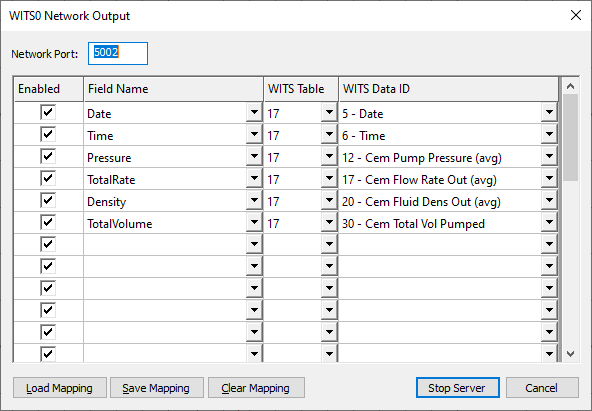
Figure 2: WITS0 Network Output dialog with the table 17 (cementing) mapping
In both cases a mapping table assigns a WITS record and item number to each Rapidlogger variable. The client tells you which codes they expect; the mapping is edited to match and saved.
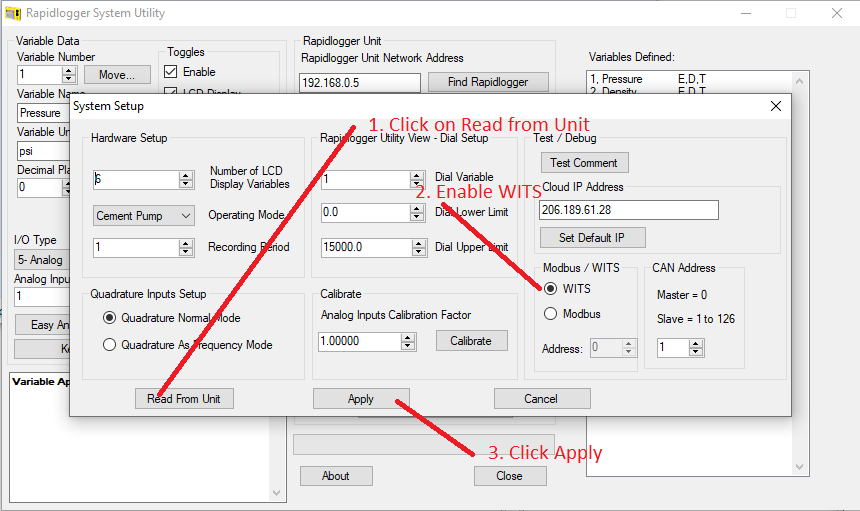
Figure 3: Enabling WITS output from the unit in the Rapidlogger Utility System Setup
The Rapidlogger also supports MODBUS (RTU and TCP) and OPC through the Rapidlogger OPC Data Gateway. These are polled rather than streamed and suit PLCs and SCADA systems better than WITS0 does.
When a Client Asks for WITSML
The Rapidlogger does not send WITSML directly. In practice this is rarely a problem, because the client's WITSML system does not expect a field instrument to do so. The usual arrangement is:
- The client, or the mud logging contractor on the rig, runs a WITSML server or a data aggregator. WITSML servers and rig data aggregators generally accept a WITS0 feed as one of their inputs.
- The Rapidlogger or RapidVu sends WITS0 to that system over the network, exactly as in Tech Note 22.
- The aggregator converts the stream to WITSML objects, adds the units and metadata, and forwards it to the operator's real-time centre.
So the answer to "can you send WITSML" is "we send WITS0 into your WITSML server". Ask the client for three things: the IP address and port their aggregator listens on, the WITS record and item codes they want for each parameter, and the units they expect. With those the mapping table can be set up before the crew leaves the yard.
If the client has no aggregator and needs WITSML files after the job, the recorded Rapidlogger job file (plain text, see Tech Note 53) can be given to the operator's data group, who can load it into their WITSML store as a log.
Checklist Before the Job
- Confirm WITS0 (not WITSML) at the connection point and whether it is serial or network.
- Get the record and item code list and the units from the client.
- Build and save the mapping in RapidVu or in _wits0.csv (Tech Note 22).
- Test with a terminal program on a second computer on the same subnet; you should see the && ... !! records scrolling.
- Write the IP address, port and mapping file name on the job sheet so the next crew can repeat it.
NOTE: The variable names in the mapping must match the RapidVu or Rapidlogger variable names exactly. A variable with a misspelled name is silently left out of the stream.
Related tech notes: #22 (WITS output setup), #52 (RapidHub for multiple units), #53 (opening the job file in Excel), #110 (RapidVu driller display). The WITS0 setup is now complete.