

Tech Note 84
This tech note describes how to install and set up a Rapidlogger on a nitrogen pumping unit. The Rapidlogger has a built-in N2 pump setup with the calculations for the liquid rate and volume and for the gas rate and total in standard cubic feet; the setup work consists of fitting three sensors, selecting the N2 pump setup on the keypad and matching the three sensor variables to the sensors with the Rapidlogger System Utility.
What the N2 Pump Setup Does
The Rapidlogger has a built-in setup for nitrogen pumping units (Figure 1). It reads the pump discharge pressure, the liquid nitrogen temperature on the suction side of the pump and the pump stroke counter or turbine meter, and it displays and records the liquid rate in barrels per minute, the liquid volume in barrels, the gas rate in standard cubic feet per minute (SCFM) and the gas total in standard cubic feet (scf). The conversion from liquid to standard cubic feet is calculated inside the Rapidlogger from the measured temperature; nothing has to be worked out by hand. This note describes the sensors, the wiring and the setup steps.

Figure 1: Nitrogen pumping unit: tank, cryogenic triplex pump, heat exchanger
Sensors Required
- Rate sensor: a proximity switch counting the cryogenic triplex pump strokes (Tech Note 113), or a cryogenic turbine flowmeter with a pulse output (Tech Note 35).
- Temperature sensor: Rapidlogger RTD probe assembly 00-94320 with thermowell, installed on the low pressure (suction) side of the pump between the tank and the pump inlet, and the Rapidlogger temperature transmitter that goes with it.
- Discharge pressure transducer, 4-20 mA, as on any pumping unit (Tech Note 112).
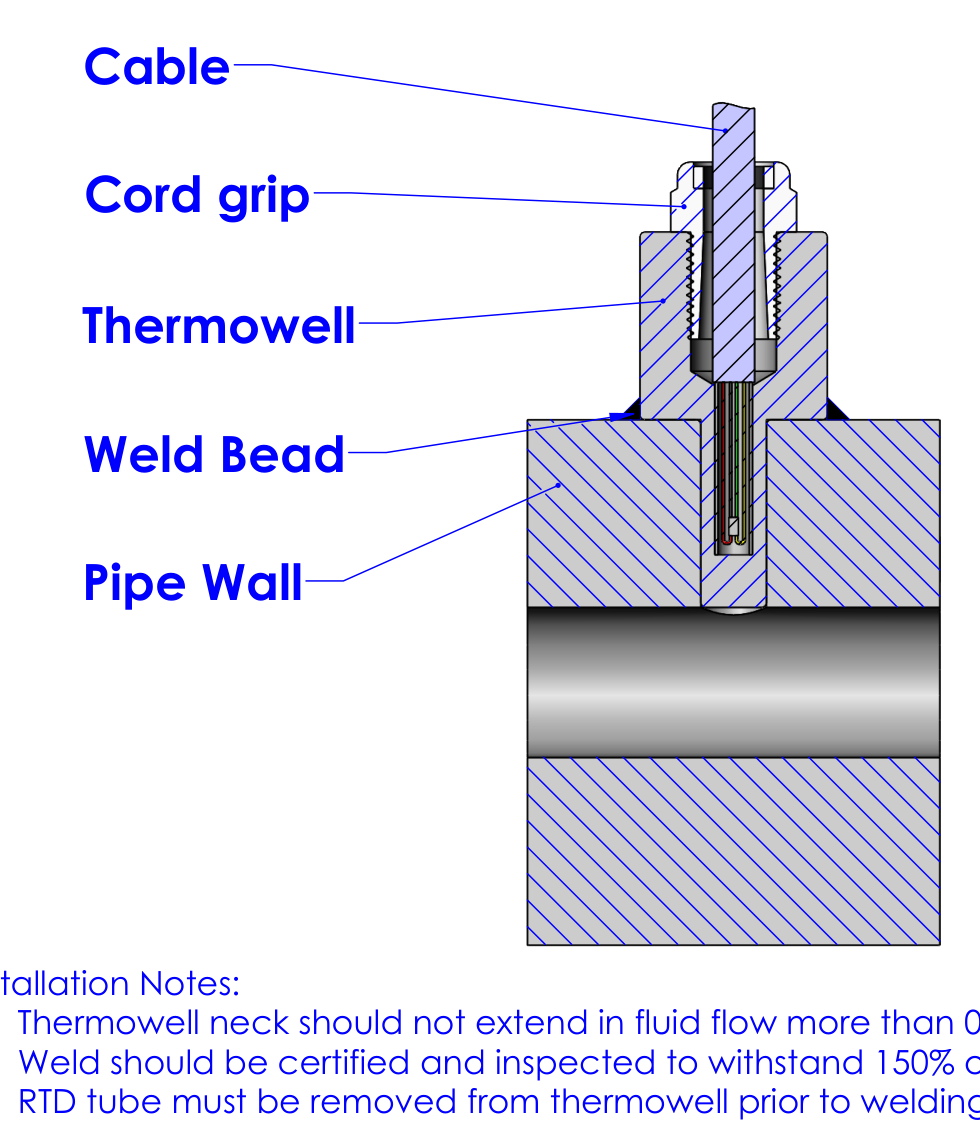
Figure 2: RTD with thermowell, assembly 00-94320, welded into the suction pipe
The RTD must sit in the liquid, not on the outside of the pipe. In assembly 00-94320 the RTD is potted in a 0.25 inch stainless tube that slides into an Inconel thermowell (Figure 2). The thermowell is welded into the suction piping on the side or bottom of a straight run, with the neck extending no more than 0.1 inch into the flow. Have the weld certified and inspected to 150 percent of the line pressure, and take the RTD tube out of the thermowell before welding.
Wiring
The RTD connects to the Rapidlogger temperature transmitter, which is factory set to give 4 mA at -200 C and 20 mA at +50 C. Wire the three sensors to the inputs below and refer to the wiring sheet supplied with your unit:
| Sensor | Rapidlogger input | Utility input number |
|---|---|---|
| Discharge pressure 4-20 mA | mA1 (JB1-12) | Analog Input Number 1 |
| Temperature transmitter 4-20 mA | mA2 (JB1-13) | Analog Input Number 2 |
| Pump prox switch or turbine meter | F1 (JB1-20) | Frequency Input Number 1 |
Step 1: Select the N2 Pump Setup on the Keypad
On the keypad press F6 (Menu), F6 (System), F4 (Setup), F5 (RST) and then F3 (N2 Pump mode), and confirm with Enter. This loads the nitrogen pump setup: Pressure on mA1, N2Temp on mA2, N2Rate and N2Volume on frequency input 1, and the built-in N2SCFM and N2SCF calculations, with the dial on pressure.
NOTE: The setup loads with factory sensor values. The three sensor variables must be matched to your sensors as described in Steps 2 to 4 before the unit is used. The calculated SCFM and scf variables need no setting.
Connect the PC, start the Rapidlogger System Utility, click Find Rapidlogger and then Read All from Unit (Tech Note 4). The variables appear in the Variables Defined list on the right of the Utility window.
Step 2: Pressure
Select the Pressure variable and enter the Multiplier and Offset for your pressure transducer (Tech Note 112). For a 0 to 15,000 psi transducer the factory values can be kept. Set Decimal Places to 0.
Step 3: Temperature
Select the N2Temp variable and set it as shown in Figure 3. These values match the Rapidlogger temperature transmitter and do not change from one unit to another:
| Field | Setting |
|---|---|
| Variable Name | N2Temp |
| Variable Units | C |
| Decimal Places | 1 |
| I/O Type | 5- Analog |
| Analog Input Number | 2 |
| Multiplier | 0.004768444 |
| Offset | -262.5 |
| Toggles | Enable, LCD Display, Record/Transmit |
With the probe in liquid nitrogen at atmospheric pressure the variable should read about -196 C. Leave the units in C: the built-in calculation expects degrees C.
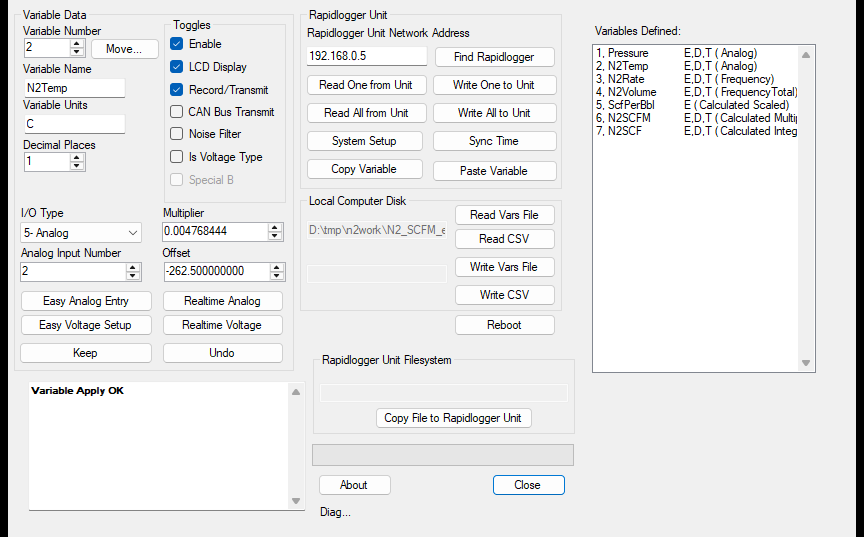
Figure 3: N2Temp variable for the Rapidlogger temperature transmitter on mA2
Step 4: Liquid Rate and Volume
N2Rate and N2Volume read the same frequency input. The units are bpm and bbl. Set the N2Volume Multiplier to barrels per pulse and the N2Rate Multiplier to barrels per pulse times 60 (Figure 4).
Prox switch on the pump: barrels per pulse comes from the pump displacement, worked out as in Tech Note 113. For example, a cryogenic triplex with 1.5 inch plungers and a 2.5 inch stroke moves 0.001366 barrels per revolution; with one pulse per revolution the N2Volume Multiplier is 0.001366 and the N2Rate Multiplier is 0.08196.
Turbine meter: use the K-factor from the meter's calibration sheet as in Tech Note 35. For 1,500 pulses per gallon the N2Volume Multiplier is 0.00001587 and the N2Rate Multiplier is 0.0009524. Only a meter rated for cryogenic service will survive in liquid nitrogen.
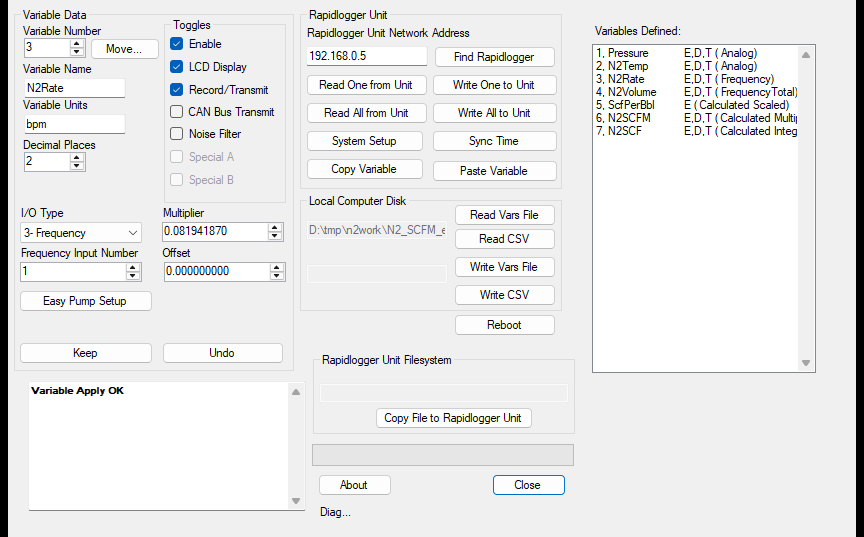
Figure 4: N2Rate on frequency input 1 with the example pump multiplier
Step 5: Write, Check and Back Up
- Click Write All to Unit. The message box must say Variable Apply OK.
- Power the unit off and on.
- Choose the LCD variables: up to six can be displayed (Tech Note 25). Pressure, N2Temp, N2Rate, N2Volume, N2SCFM and N2SCF fill the six places.
- With the pump running, compare N2Rate with the pump maker's rate chart or the unit's own gauge, and N2Temp with the tank temperature. If the rate disagrees, check the barrels per pulse (Tech Note 17 pumping test).
- Zero N2Volume on the keypad at the start of each job; N2SCF zeroes with it.
- Save the setup to a file with Write Vars File (Tech Note 13).
Related tech notes: #4 (using the Utility), #13 (backing up the variables), #17 (pumping test), #35 (turbine flowmeters), #112 (pressure transducer), #113 (pump displacement for a stroke counter).